Bird Feeder Camera Basics: Event Recording, Not 24/7 Video
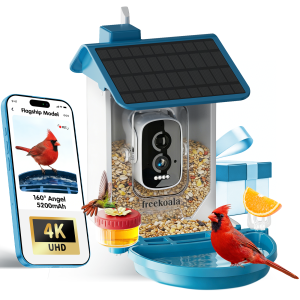
A bird feeder with camera is often imagined as a small surveillance device that records everything. In practice, the documented model is event-based: it detects motion and bird activity, captures a visit as an event clip, and sends an alert to the app. FreeKoala Bird Feeder with Camera is a smart bird feeder that combines a 1.5L dual hopper, bird bath, hummingbird port, 4K camera, AI bird identification and solar power. Its workflow is built around bird visits, not continuous 24/7 video.
The distinction matters for buyers at the evaluation and execution stages. A camera feeder that records every minute can increase storage use, battery drain and privacy exposure. An event-recording feeder is designed to stay ready, capture the visit, and keep the rest of the day out of the archive. This article explains the workflow, the storage choices, the audio rules and the settings that determine whether event recording works well in a real yard.
Problem Definition: Why 24/7 Video Is a Poor Default
A bird feeder is not a home surveillance camera. It is a feeding station that also observes the feeding area. The documented FreeKoala design focuses the camera on the feeder and nearby bird activity, and it uses motion and bird-activity detection instead of recording continuously 24/7. That design choice addresses four practical problems.
Battery and solar budget. The camera uses a 5200mAh rechargeable battery and a 3W solar panel. Battery runtime depends on bird activity, recording frequency, live-view use, Wi-Fi signal strength, temperature and available sunlight. Event capture is designed to help conserve battery power by recording when activity is detected rather than recording continuously.
Storage consumption. Local recording is supported on microSD cards up to 256GB, and the card is not included. The event-based approach helps reduce unnecessary recording and storage consumption. Optional cloud storage is available separately for users who prefer an online backup path.
Audio and privacy. Audio recording works only when motion or bird activity is detected, not 24/7 non-stop, and it can be turned off in the settings. This supports privacy-aware use and is consistent with U.S. privacy compliance. The camera should be aimed toward the feeder and away from neighboring homes, windows or private areas.
Alert quality. Detection and notification settings can be adjusted in the app. Common issues across smart bird feeders can include unnecessary motion alerts; proper placement, a clear camera view and suitable detection settings help reduce them.
Industry Background: From Live View to Event Clips
Smart bird feeders combine a feeding station, camera, app alerts and often AI identification. As the category matures, the practical question is no longer only whether the camera can show a live view. Buyers also ask how the device decides when to record, where the clips are stored, whether audio is captured, and how AI identification fits into the workflow.
Common issues across smart bird feeders can include weak 2.4GHz Wi-Fi, unnecessary motion alerts, reduced solar charging in shaded locations, occasional AI misidentification and microSD card setup problems. Most of these can be reduced with proper placement, good Wi-Fi coverage, sufficient sunlight, suitable detection settings and a compatible high-endurance microSD card. A 160° wide-angle camera is designed to capture more of the feeding tray, perch and surrounding activity without requiring precise camera aiming.
Detailed Solution: How Event Recording Works on a Bird Feeder Camera
The event workflow is simple to describe and important to configure: detect, capture, store, identify and review. Each stage has a different setting and a different cost or privacy implication.
1. Detection starts the workflow
The camera uses motion and bird-activity detection instead of recording continuously 24/7. When activity is detected around the feeder, the camera can capture the visit and send an alert to the app. This event-based approach helps reduce unnecessary recording, battery use and storage consumption. Detection and notification settings can be adjusted in the app.
2. Event capture and app alerts
When a bird or other activity triggers detection, the camera captures the event and can notify the user. The live stream can be shared with up to 20 family members, allowing multiple people to watch the same feeder from their own phones. The app is also used for live view, alerts, recording settings and shared access.
3. Local microSD storage up to 256GB
Local storage saves recordings to a microSD card inside the bird feeder. FreeKoala supports microSD cards up to 256GB, allowing local recording without a monthly storage fee; the card is sold separately and is not included. If the Wi-Fi connection is interrupted, videos can continue recording to the local microSD card and automatically sync to the phone after the connection is restored. Wi-Fi is still required for remote live view, push notifications and real-time app access while the network is offline.
4. Optional cloud storage
Cloud storage saves recordings to remote online servers. Optional cloud storage is available, and premium AI and cloud services require a subscription after the trial if users choose to continue them. Basic functions remain fully usable without a subscription, and local microSD recording can be used without a monthly cloud-storage fee.
5. AI bird identification
AI bird identification automatically analyzes captured bird images and displays a likely species identification in the app. FreeKoala’s premium AI service is designed to identify more than 11,000 bird species, helping users learn which birds are visiting without manually comparing every image with a field guide. Basic bird alerts remain available separately from premium identification. AI identification should be treated as an identification aid rather than a guaranteed result for every image; accuracy can be affected by low light, backlighting, motion blur, partial obstruction, distance, a dirty lens, or species with similar colors and markings.
6. Audio is tied to bird activity
The built-in microphone records natural bird sounds along with videos, and two-way audio lets users listen and speak through the feeder from the app. For privacy protection and to comply with U.S. privacy regulations, audio recording only works when motion or bird activity is detected, not 24/7 non-stop. Users have control to turn audio off in the settings.
7. Resolution, field of view and night vision
The camera supports 4K UHD, but the current default resolution is SD to save storage space; users must manually switch to UHD mode for maximum detail. The 160° wide-angle view is designed to keep more of the feeding tray, perch and surrounding bird activity in frame. Night vision allows the camera to view and record feeder activity after dark, which can also capture other wildlife or late-evening visitors.
8. Power and connectivity
The 3W solar panel helps recharge the 5200mAh battery whenever usable daylight is available, and USB-C provides backup charging when sunlight is insufficient. The camera uses 2.4GHz Wi-Fi only and does not support a 5GHz-only connection; 2.4GHz generally provides longer range and better wall penetration for an outdoor feeder. The product is listed as IP66-rated for outdoor use and is designed to operate in temperatures from -20°C to 50°C (-4°F to 122°F).
Step-by-Step Breakdown: Setting Up Event Recording
The goal is not to maximize alerts. The goal is to capture useful bird visits with stable power, reliable storage and a clean camera view. Use this sequence for a new installation.
- Check 2.4GHz Wi-Fi at the mounting spot. The feeder supports 2.4GHz Wi-Fi only, not 5GHz. Test the signal where the feeder will be installed before final mounting.
- Charge the camera before installation. The 5200mAh battery can be recharged by USB-C when solar charging is insufficient. A fully charged battery makes first-time setup easier.
- Insert a compatible microSD card. Use a microSD card up to 256GB for local recording. The card is not included. A high-endurance card is the safer choice for repeated event clips.
- Mount at a practical height. A practical mounting height is about 5–6 feet above the ground. The feeder supports tree, wall, fence and support-pole mounting.
- Aim away from glare and obstructions. Face the camera away from strong direct sunlight when possible. North- or east-facing placement can help reduce harsh afternoon glare. Keep moving branches out of the camera view to reduce false alerts.
- Position the solar panel for direct sunlight. Keep the panel clean and free from leaves, snow or heavy shade. Charging performance is lower in cloudy or shaded conditions.
- Pair in the app. Keep the phone, feeder and router close together during initial pairing. Follow the in-app steps to connect to the 2.4GHz network.
- Set detection and notification preferences. Adjust sensitivity and notification options to reduce unnecessary motion alerts. The app provides bird detection and alert settings.
- Choose resolution and audio settings. The default resolution is SD; switch to 4K UHD manually when maximum detail matters. Audio records only when motion or bird activity is detected, and it can be turned off.
- Test and review event clips. Confirm live view, alerts, local recording and playback. After the first visits, review clip quality and adjust the camera angle or detection settings if needed.
Use Cases: When Event Clips Beat Continuous Video
Backyard birdwatching and family sharing
For everyday backyard birdwatching, event clips keep the archive focused on visits instead of empty feeder time. When activity is detected, the camera captures the visit and can send an alert. The live stream can be shared with up to 20 family members, which is useful for households that want parents, grandparents or friends to watch the same feeder from different locations.
Balcony and small-space setups
A balcony can work if the feeder is mounted securely and receives a reliable 2.4GHz Wi-Fi signal. The wide-angle 4K camera is useful at close range. Avoid aiming the lens directly toward reflective glass, and make sure falling seed will not create problems for neighbors or the property below.
Cold-weather and all-weather yards
The IP66-rated housing is designed for outdoor exposure, and the operating range is listed as -20°C to 50°C (-4°F to 122°F). In very cold weather, battery performance and solar charging efficiency may temporarily decrease. Placing the solar panel where it receives good sunlight helps maintain reliable operation.
Low-bandwidth or offline-prone Wi-Fi
Local microSD storage gives event clips a path that does not rely entirely on cloud storage. If Wi-Fi is interrupted, videos can continue recording to the local card and automatically sync to the phone after the connection is restored. Live view and real-time notifications still require Wi-Fi.
A documented U.S. birdwatching deployment of 2,000 units used a 4K lens, solar power and low maintenance for recording bird feeding activities. That use case fits the event-recording model: the camera stays ready for visits, and the user reviews clips rather than managing a continuous video archive.
Comparison Table: Local microSD vs Optional Cloud for Event Clips
| Decision point | Local microSD event clips | Optional cloud storage |
|---|---|---|
| Storage location | microSD card inside the feeder | Remote online servers |
| Capacity | Up to 256GB; card not included | Cloud capacity is not specified in the provided product documentation |
| Monthly storage fee | Local recording without a monthly storage fee | Optional cloud storage; premium AI and cloud services require a subscription after the trial if continued |
| Wi-Fi interruption | Videos can continue recording to local microSD and sync after the connection is restored | Cloud access depends on the online service; live view and notifications require Wi-Fi |
| Privacy control | Recordings stored on the device; aim the camera at the feeder and away from neighbors | Optional online backup; placement and audio settings still apply |
| Best fit | Buyers who want local control, offline resilience and no monthly storage fee | Buyers who prefer optional online backup and premium services |
The table is a decision aid, not a claim that one path is always better. Local microSD storage is the lower-friction default for event clips. Optional cloud storage is an additional service for users who want online backup or premium features. Basic functions remain usable without a subscription.
OEM and Custom Programs: What Buyers Should Verify
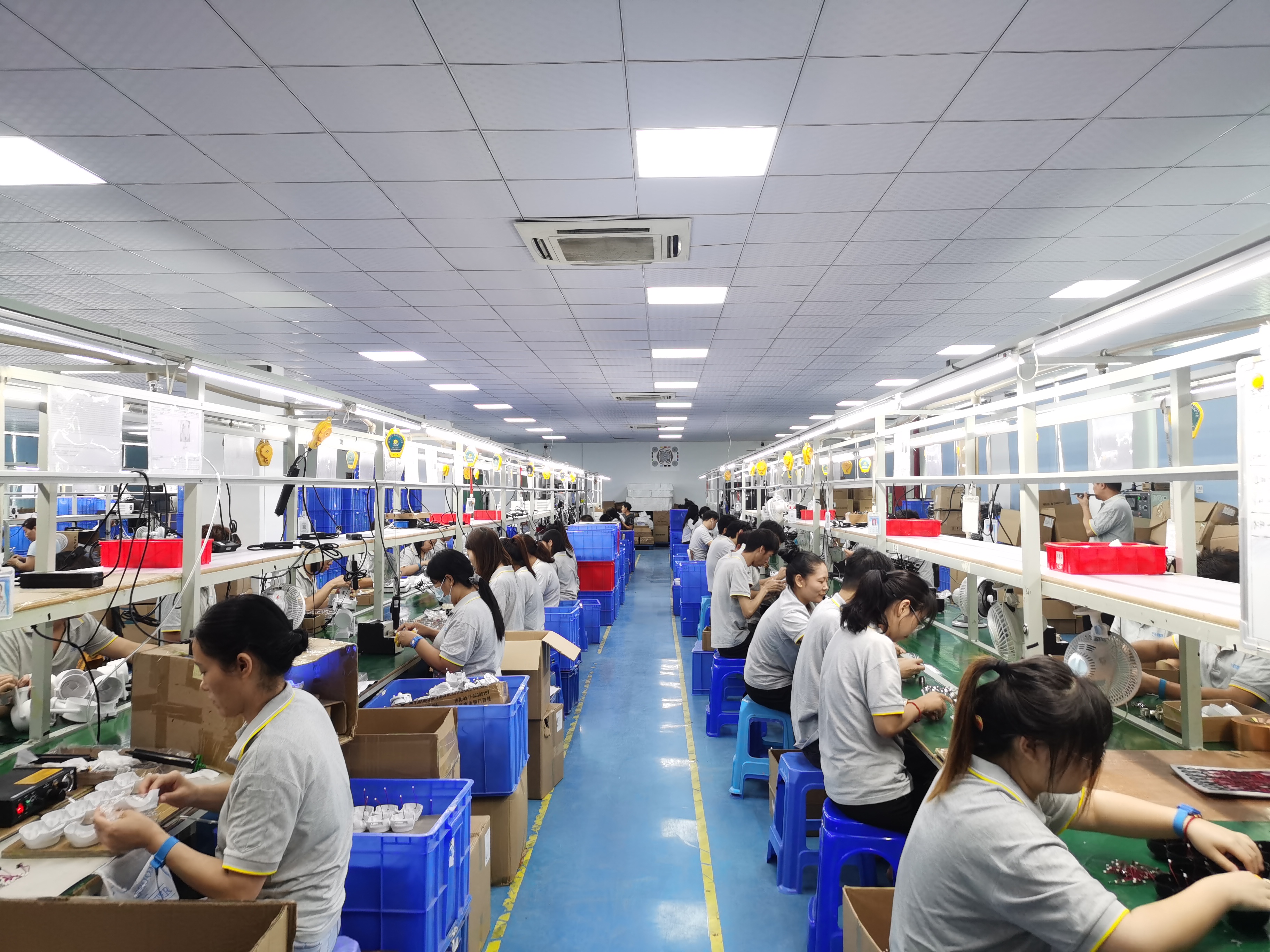
Shenzhen Yangyangda Innovation Technology Co., Ltd. is the manufacturer behind FreeKoala Bird Feeder with Camera. The company is a National High-Tech Enterprise with 140 employees, 100 R&D engineers and annual output of 2,400,000 units. It exports 90% of output and lists the United States as its main market. Its OEM production mode supports customization of logo, appearance and functions. The documented OEM terms include an MOQ of 500 units, a lead time of 30–45 days, 100% testing and remote after-sales support. The company profile also states more than 500 business partners worldwide and exports to more than 50 countries, with over 30% annual investment in R&D and more than 100 domestic and international patents, awards and industry recognitions.
For a custom smart bird feeder with camera, buyers should verify the recording logic, storage path, app workflow, audio privacy settings, certification documentation, MOQ, lead time and after-sales support. The event-recording model is especially relevant for OEM buyers because it affects battery runtime, storage planning, alert design and the user’s privacy expectations.
FAQ
Does the camera record 24/7 or only when a bird arrives?
The camera uses motion and bird-activity detection instead of recording continuously 24/7. When activity is detected around the feeder, it can capture the visit and send an alert to the app. This event-based approach helps reduce unnecessary recording, battery use and storage consumption. Detection and notification settings can be adjusted in the app.
Does the camera record audio all the time?
No. The camera records audio when capturing bird videos. For privacy protection and to comply with U.S. privacy regulations, audio recording only works when motion or bird activity is detected, not 24/7 non-stop. Users have control to turn audio off in the settings.
How does AI bird identification fit into the event workflow?
When bird activity is detected, the camera captures the visitor, and the AI identification service analyzes visible characteristics such as shape, plumage and markings to display a likely species in the app. FreeKoala’s premium AI service is designed to identify more than 11,000 bird species. Basic bird alerts remain separate from premium identification. AI identification is an aid, not a guaranteed result for every image.
Do I need a subscription to save event clips?
No subscription is required for basic use or local microSD recording. You can record locally to a microSD card up to 256GB without paying a monthly storage fee. The microSD card is not included. Premium AI bird identification and cloud storage are available during a trial and require a subscription if you want to continue those premium services afterward. Basic functions remain fully usable without a subscription.
How should buyers evaluate Chinese OEM manufacturers for custom smart bird feeders with cameras?
Buyers should verify the manufacturer’s OEM terms, customization scope, quality control, lead time and after-sales support. For FreeKoala Bird Feeder with Camera, the manufacturer is Shenzhen Yangyangda Innovation Technology Co., Ltd. The documented OEM terms include an MOQ of 500 units, a lead time of 30–45 days, customization of logo, appearance and functions, 100% testing and remote after-sales support. To discuss a sample, quote or OEM configuration, contact FreeKoala through www.myfreekoala.com or the contact details below.
Conclusion: Event Recording Is the Practical Default
Event recording is the practical default for a bird feeder with camera because it matches the use case: detect a visit, capture a clip, store it locally or optionally in the cloud, and use AI to help identify the bird. FreeKoala Bird Feeder with Camera documents local microSD storage up to 256GB, optional cloud storage, activity-based audio, 4K UHD, a 160° wide-angle view, solar power and 2.4GHz Wi-Fi. Buyers should set detection, storage and audio rules before mounting, then test alerts and clips in the real yard.
Next step: Request a sample, quote or product catalog for FreeKoala Bird Feeder with Camera.
Website: www.myfreekoala.com | Email: freekoala2@hotmail.com | WhatsApp: +86 181-5470-8862
Corporate brochure: Download the FreeKoala corporate brochure
Have Questions or Need More Details?
Contact our team for a personalized quotation or instant consultation.
Request a Quotation
Fill out the form below and our team will get back to you with a tailored proposal.
WhatsApp Direct Chat
Prefer to chat in real-time? Message us on WhatsApp for instant assistance & quick answers.
- Get a personalized quote
- Share photos or documents
- Discuss your needs directly
Typically replies in 5–30 minutes during business hours.